
Analytic Account: This type of account searches for metric values of the forms that make up the budget.
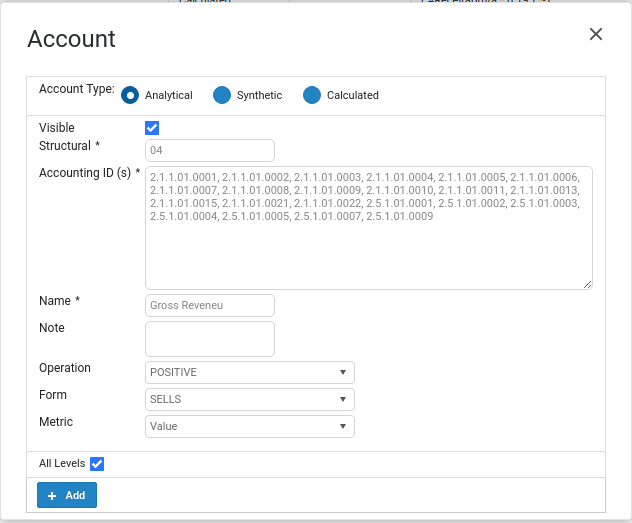
Parameters:
Visible: Whether the account will appear in the DRE for users.
Structural: Account structural code.
Accounting Codes: Accounting account code.
Name: Account name.
Note: Make a comment about the account.
Operation: POSITIVE or NEGATIVE, if the account will add or subtract value.
Form: Select the form to which the account will be applied.
Metric: Select the metric of the form chosen to apply the account.
Levels: Check the option to select the metric value for all categories of the form or uncheck to select a specific one.
Synthetic Account: This type of account allows you to create an account and then add all other accounts that will make up the value of this synthetic account.
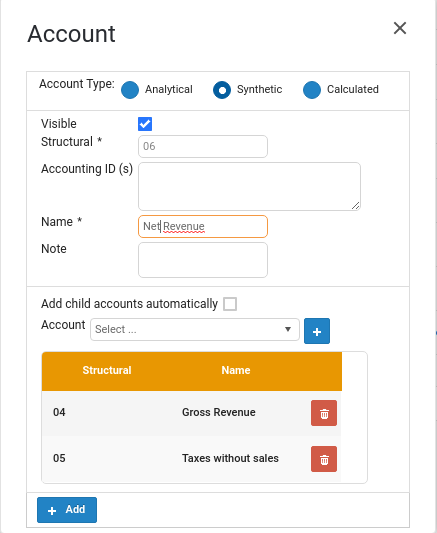
Parameters:
Visible: Whether the account will appear in the DRE for users.
Structural: Account structural code.
Accounting Codes: Accounting account code.
Name: Account name.
Note: Make a comment about the account.
Add child accounts automatically: Option to automatically add accounts with a hierarchical level below, accounts that are linked to others will not be added.
Account: Allows you to select accounts and group them.
Calculated Account: Allows the use of formulas to compose their value.
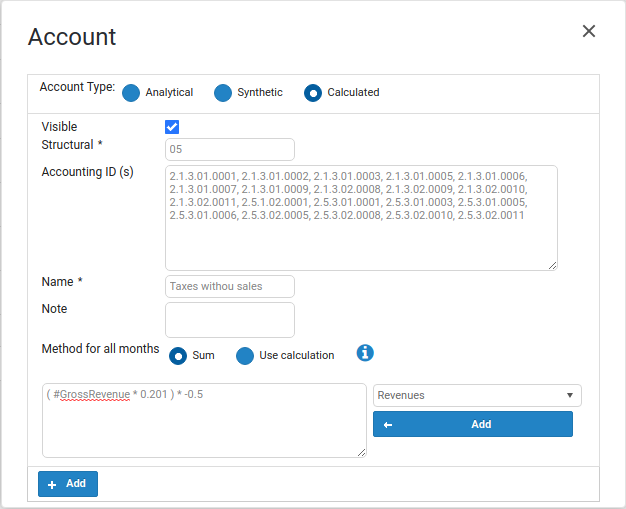
Parameters:
Visible: Whether the account will appear in the DRE for users.
Structural: Account structural code.
Accounting Codes: Accounting account code.
Name: Account name.
Note: Make a comment about the account.
Method for all months (GENERAL): Select the operation to be performed when the selected period is the year.
– Add: Adds the value of all months to set the value in the year.
– Use calculation: Use the calculation to set the value in the year.
Mathematical field: Select the values on the right side for mathematical operations